
Give your Hero image one clear job
Your Amazon Hero image is the main product photograph that introduces the offer. It needs to make the product recognisable before a shopper studies the supporting images. A dramatic angle is not automatically the most useful one: begin with the view that makes the shape, finish and identity easiest to understand.
This guide looks specifically at briefing that first photograph. For the complete sequence of detail views, graphics and lifestyle scenes, see our Amazon listing image-set guide. A Hero image does not need to answer every buying question on its own.
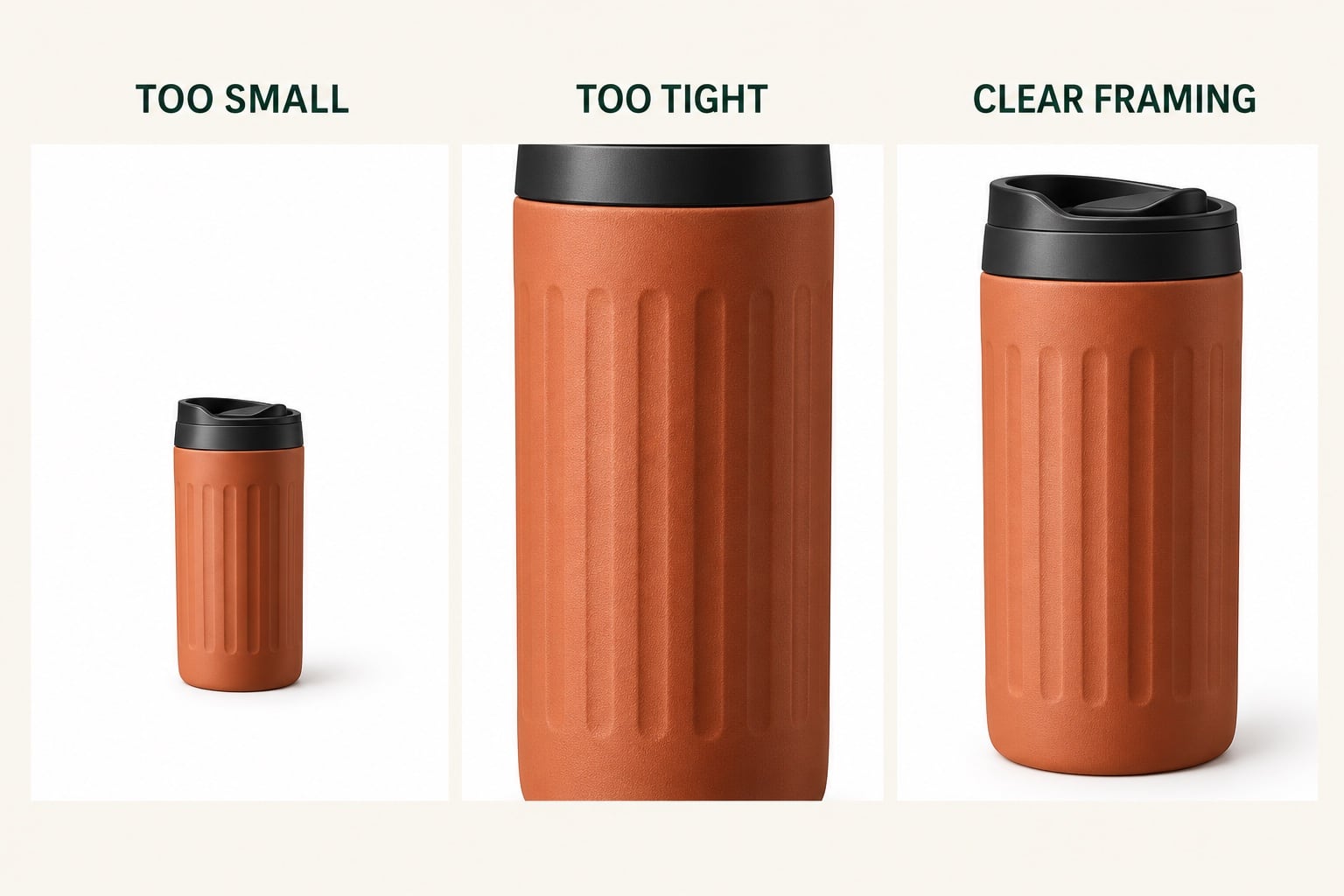
The comparisons here are AI-created teaching illustrations using fictional products. Their labels and multiple panels explain the decisions; they are not files to upload as an Amazon main image.
Check the requirements before choosing the composition
Amazon’s published product photography guidance calls for a pure white main-image background and the product to fill at least 85% of the frame. Its Seller Central image requirements are the place to check the current rules for your marketplace and product category before commissioning the work.
Plan a photograph of the actual product, with no added promotional text, badges or watermarks. Printing and branding physically present on the product should remain accurate; removing a genuine label is different from avoiding an added graphic. Supply the studio with any category-specific guidance that applies to your listing.
Agree the required dimensions and file format before delivery. Do not treat a competitor’s image as proof of what is permitted, and do not assume that an attractive image guarantees acceptance by Amazon.
Fill the frame without cutting off the product
In the mug comparison above, the first version gives too much space to the background. The middle version loses the lid and base. The final version makes the complete object easier to inspect while leaving a small amount of room around it.
Ask the photographer to check both the full-size image and a small thumbnail. Handles, spouts, straps and projecting corners need to remain visible. A crop that works for a compact jar may be unsuitable for a long tool or a wide set of items.
The illustration demonstrates framing choices rather than a measured compliance test. Agree a crop appropriate to the actual product and Amazon’s current requirements. Enlarging a small, soft original will not reveal missing detail; the capture needs enough resolution in the first place.
Choose the angle that explains the shape
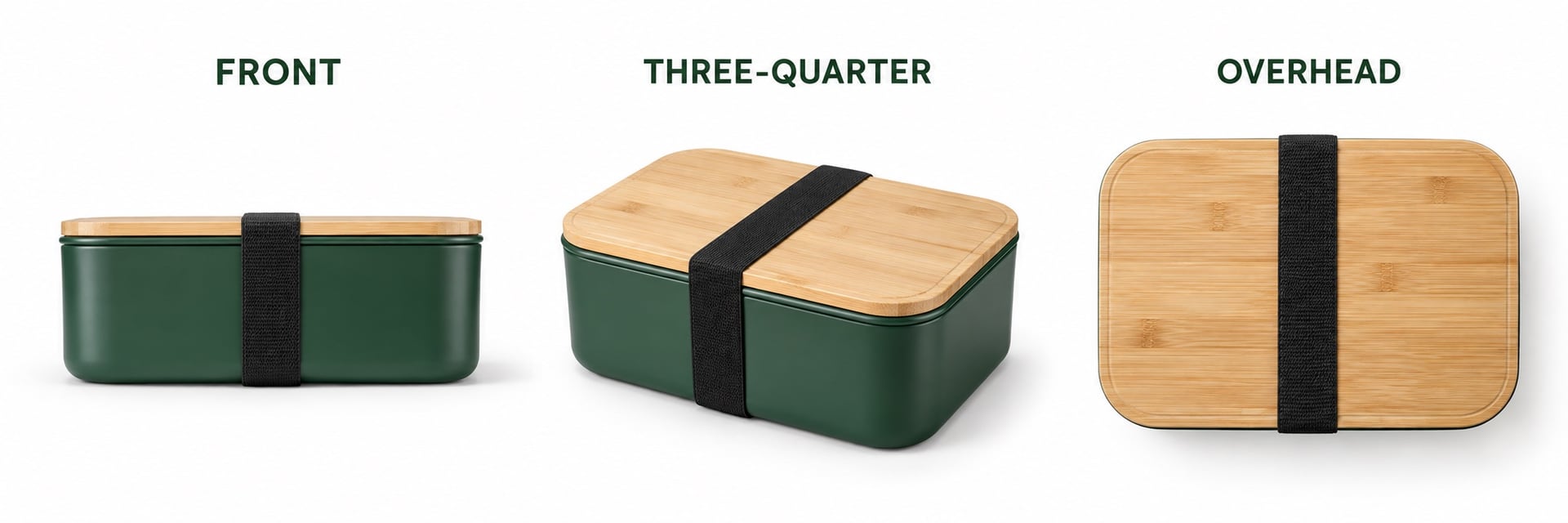
The lunchbox comparison shows why the angle belongs in your brief. The front view makes the body easy to read but reveals little of the lid. The three-quarter view shows the lid, side and depth together. The overhead view explains the footprint and strap position, but hides the height.
For this example, the three-quarter view is a useful starting point for the Hero image. A different product may need a straight-on view to keep its label readable, or a carefully chosen elevation to show an opening. Choose according to the information the photograph needs to convey.
If you are uncertain, discuss a small number of alternative angles before the shoot and agree how those alternatives affect the quotation. Do not expect a single view to show the front, back and inside simultaneously. Supporting photographs can explain what the main view cannot.
Keep labels, colour and material believable
Tell the studio which features must remain visible: a printed product name, a lid mechanism, the texture of a grip or the edge of a transparent container. Position and lighting need to work together. Rotating a bottle to reduce glare may also turn its label away from the camera.
Send clean, representative samples with the final artwork and finish. Point out packaging revisions or temporary labels before photography begins. Retouching can clean distracting dust and prepare a tidy background, but it should preserve real lettering, proportions, colour and material.
White and reflective products need particular attention to edge definition. The aim is a clear outline without making a white item grey or making a satin finish appear polished. Our reflective product photography guide explains what to include in that brief.
Be precise about sets, accessories and packaging
Give the photographer an inventory for the exact offer being photographed. State whether the customer receives one item, a multipack or a kit, and identify the included accessories. Keep samples for different variants clearly labelled so an accessory from another version does not slip into the composition.
Packaging should be discussed rather than automatically added. Check whether it belongs in the main image for your category and offer; a separate supporting photograph may explain it more clearly. Decorative props and items sold separately can make the offer ambiguous.
For a set, ask for a layout in which the supplied pieces can be distinguished without hiding the main product. If arranging everything makes each piece too small, discuss the main image and a separate contents view together. See our packaging photography guide for further planning questions.
Send a brief the studio can act on
For a useful quotation, send your product list, the number of variants, an inventory of included items and the Amazon category requirements you are working to. Add existing listing links, reference angles and any details that must remain readable. Explain whether you need only a new Hero image or a complete supporting set.
Ask to agree the angle, framing, background finish and scope of retouching before the full batch is completed. Review the proof at thumbnail size as well as enlarged, checking that it shows the correct product, quantity and version. Confirm the approved filenames against your product list before upload.
Our Amazon product photography service can help you plan a clear Hero image alongside the supporting photographs your listing needs. Send David your product details and current images to discuss the shoot.
Amazon guidance checked on 30 October 2026. Requirements can vary by marketplace and category; confirm the current Seller Central guidance before approving or uploading files.