

Guide · Amazon photography
Amazon infographic images: how to explain your product clearly
Turn product facts into clear supporting graphics, with visual examples and a practical brief for your studio.
Give each infographic one useful job. Choose a photograph that shows the feature, add only verified information, and check that the message stays readable at a small size. Keep graphics separate from your hero image.
Start with one buying question
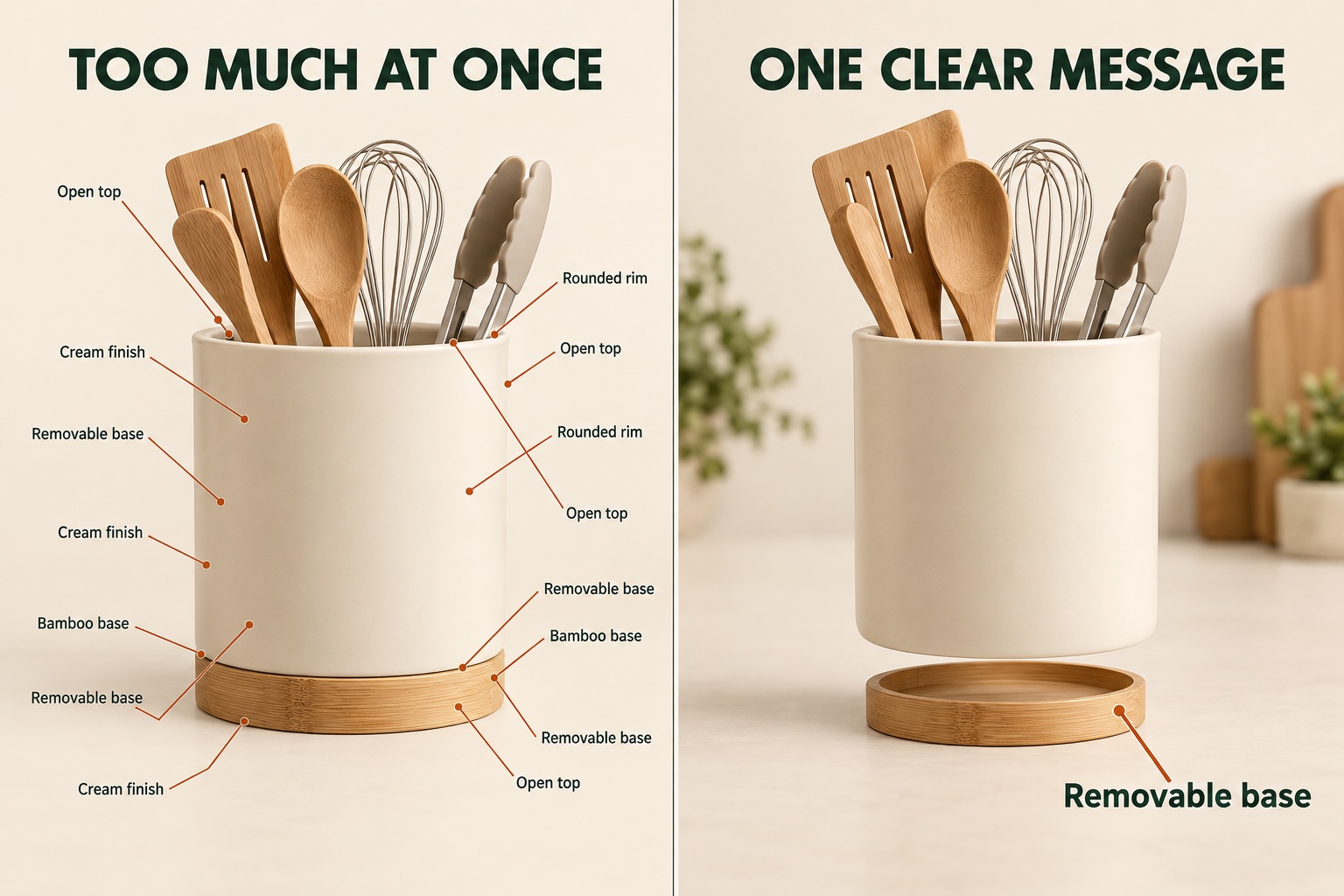
An Amazon infographic combines a product photograph with a small amount of useful information. Its job is to explain something the photograph alone leaves uncertain: how wide the item is, which part comes off, or exactly what arrives in the box. Start with that question before choosing colours, icons or headings.
The comparison above shows why this matters. The crowded version repeats labels and sends the eye in several directions. The clearer version concentrates on the removable base, using a separated view and one label. The improvement comes from choosing a message, not simply making the lettering bigger. Utensils are styling props in this fictional example; a real listing should make clear whether they are included.
For your own product, write down the questions customers ask before purchasing. Pick the ones a visual can answer accurately. A photograph of a removable part is useful evidence of its construction; a decorative badge saying “premium quality” tells the buyer much less.
Separate features, dimensions and included parts
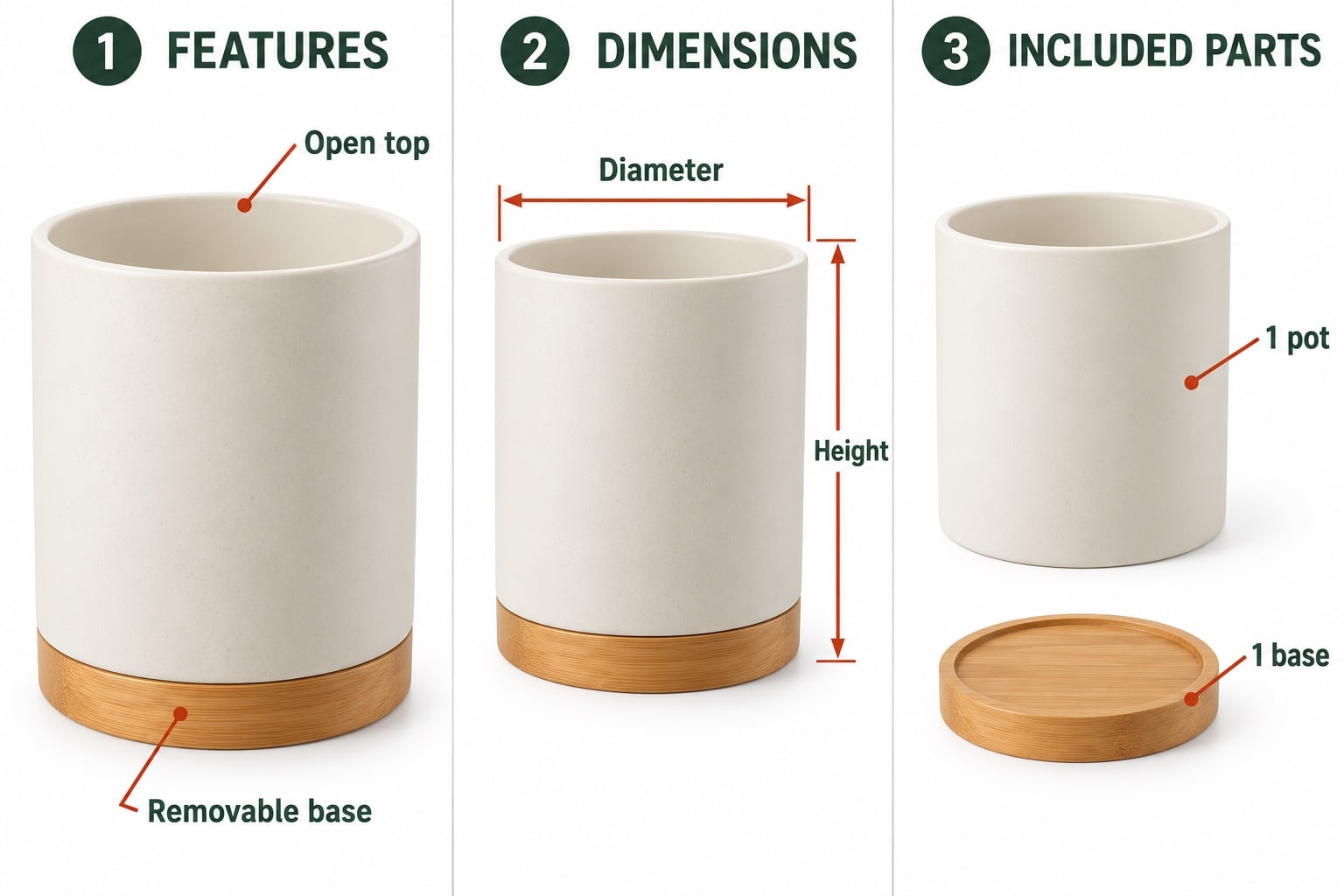
The three examples below give the same product three different jobs. They are suggested supporting images, not a compulsory Amazon sequence. Keeping each message separate gives both the product and the explanation room to be understood.
- Features: point to a relevant part and describe it briefly. “Removable base” explains what the buyer is looking at without adding an unsupported performance claim.
- Dimensions: show the measurements needed to judge fit. Supply verified figures and units; the example uses “Height” and “Diameter” to show placement without inventing specifications.
- Included parts: show the actual contents and quantities. A separate pot and base should not look like two complete products or imply that styling accessories are supplied.
These are AI-created teaching examples. For commissioned graphics, use photographs of the actual product, its real specifications and the correct version of its packaging.
Keep infographics separate from the hero image
Your hero (main) image introduces the product in search and on the listing. Amazon’s general main-image rules exclude added text and graphic overlays. Plan your explanatory graphics as supporting images, and check the rules for your category and marketplace before commissioning them.
Amazon’s Seller Central product image requirements are the place to confirm the current requirements for your listing. Its product photography guidance also explains the different purposes of detail, scale and lifestyle photographs. Do not assume that an image accepted on another seller’s listing is a suitable template for yours.
If you are planning the whole shoot, start with our Amazon listing photography guide. This article focuses on the supporting graphics within that wider image set, rather than replacing the clean photographs.
Choose the photograph before placing the labels
A graphic is easier to understand when the camera angle already shows the feature clearly. If the message concerns a fastening, photograph the fastening. If a base detaches, plan an assembled view and a separated view. Trying to explain a hidden feature with arrows and text usually makes the design work harder.
Tell the studio which graphics you intend to create before the shoot. That allows room around the product for measurements and captions, and helps identify any extra close-ups you need. Ask for a clean photographic version as well as the finished graphic when both form part of the agreed delivery.
Existing photographs may be usable if they are sharp, sufficiently large and show the current product accurately. Send the original files for assessment, not screenshots copied from a listing. Our photo editing brief guide explains how to supply files and references for this kind of work.
Check the message at a small display size
A graphic that looks comfortable on a large monitor can become crowded on a phone. Review the whole composition at a small size as well as inspecting the full-resolution file. Can you identify the product, read the main message and follow the pointer without searching?
Use a short heading, restrained labels and clear contrast. Keep text away from busy details and avoid putting several arrows through the product. Where a graphic needs a long paragraph to make sense, consider splitting the information into separate images or moving the detail into the listing copy.
Use a consistent type style and colour treatment across the set. Consistency helps the images feel related, but every layout should still suit its own message. A dimensions view needs space around the outline; a close-up may need a different crop.
Supply facts that can be checked
The client should provide approved measurements, materials, quantities and feature wording. Identify whether a measurement is external or internal, whether a capacity is usable or total, and which product variant the information belongs to. A designer should not have to infer these facts from the photograph.
Keep claims within what you can support. Showing a seal does not demonstrate that a container is leakproof, and a close-up of a coating does not prove scratch resistance. If a claim needs evidence or qualification, settle the wording before it is placed in the artwork.
Amazon’s image guidance also prohibits customer-review imagery, five-star imagery and Amazon-style promotional badges. Avoid turning a useful product explanation into a collection of ratings or sales slogans. Check the finished wording against the current rules in your seller account.
Give the studio a clear infographic brief
A practical brief lists each proposed graphic, the question it should answer, the required photograph and the exact information to add. For example:
We need three supporting graphics for a cream utensil pot: a removable-base feature view, a dimensions view using our supplied measurements, and a contents view showing one pot and one base. Utensils are not included. Please quote the photography and graphic layout separately. We will supply approved wording, product codes and our brand colours.
Include the target marketplace, product category, current listing if available, required file specifications and who will approve the proofs. Agree how many graphics, variants and revision rounds are included in the quote. A new colour or size may need both a different photograph and different information.
Before signing off, check each graphic against the sample and the product description. Confirm quantities, units, spelling, arrow placement and the absence of unintended props. Then review the uploaded images on the listing itself.
See our Amazon product photography service for examples, or discuss existing files through our photo editing service. Send David your product list and proposed graphics to establish what photography and editing work is needed.
Amazon guidance reviewed on 28 October 2026. Category and marketplace requirements can differ; check your current Seller Central guidance before upload.
Service information and further reading
Need clearer images for your Amazon listing?
Send David your product details, existing photographs and proposed graphics to discuss the work required.